HVPane™
Why HVPane exists

Leaving VMware is the easy part.

The hypervisor was never the hard bit. Hyper-V comes with the Windows Server licences you are already buying. What does not come with it is a way to see all of it at once — and that is the job this was built to do.

What changed

Broadcom completed its acquisition of VMware at the end of 2023. The product line was consolidated into a small number of subscription bundles, perpetual licensing was retired, and a great many organisations opened a renewal quote that did not look like the last one. Two years on, the migrations are still under way.

You already know whether this is your situation. If it is not, the rest of this page is still the reason the product exists — the tooling gap is the same whether you arrived at Hyper-V last month or a decade ago.

We are not going to tell you what your VMware renewal costs. We do not know, nobody outside your account team does, and any vendor showing you a tidy side-by-side saving has invented half of it. What we will do is publish our own prices in full, so the only number you have to find is the one you already have on an invoice.

Hyper-V is not free. It is included — which is better.

This distinction gets flattened constantly, and it matters. The standalone free Hyper-V Server product was discontinued; 2019 was the last release of it. What exists today is the Hyper-V role inside Windows Server — the operating system you are already licensing for the workloads themselves.

So the platform cost does not reappear as a separate line. Datacenter edition covers unlimited virtualised instances on that host. For an organisation already standardised on Windows Server, the hypervisor is a role you switch on, not a product you go and buy.

Which is precisely why migrations land here. And then you open the management tools.

Then you open the tools

Everything below is real, supported and works. None of it was built to answer the question an operator actually asks at nine in the morning, which is what, across everything I run, needs me today?

Hyper-V Manager
one host at a time

Console for a single host. Excellent at what it does. Point it at forty hosts and you have opened forty windows.

Failover Cluster Manager
one cluster at a time

Cluster-aware, which is a real step up — and still bounded by the cluster. Nothing in it compares this cluster with the eleven others you run.

Windows Admin Center
many machines, one at a time

A genuine improvement, and free. It has role-based access on the gateway, it logs what you do, it runs Cluster-Aware Updating, and it can find machines in Active Directory. What it does not do is aggregate: every view is one target at a time.

System Center — VMM
the enterprise answer

The most complete option Microsoft offers, and for some organisations it is the right one. It is also a licensed product with real deployment weight, bought as part of a suite that carries far more than virtual machine management.

The result is that a Hyper-V estate is usually running with every fact available and no single place that ranks them. The checkpoint someone made in 2019 is visible — on that host, if you go and look. The cluster that cannot survive losing a node is knowable — if you do the arithmetic yourself, this morning, again.

The same estate, through five tools

Every cell below is checkable by anyone holding a Windows Server licence. We have grouped the rows honestly — including the ones where we are not the answer, because a table that wins every row is a table nobody believes.

  Hyper‑V Manager Failover Cluster Manager Windows Admin Center System Center VMM HVPane
Where HVPane is the answer
What changed since the last sweep No No No No Yes
Issues ranked across the estate, each with a next step No No No Alerts, via Operations Manager Yes
N‑1 headroom — can this cluster lose a node? No No No Host reserves, placement ratings Yes
Days until a cluster crosses a threshold No No No Trending, with a data warehouse to stand up On the console
Configuration drift as a standing node‑by‑node matrix No Validation report, on demand, per cluster No No Yes — supports your CIP‑010 evidence
Who took this checkpoint No No No If it was taken through SCVMM Whoever took it, whereverRequires Professional
Where it is a draw — and we will not pretend otherwise
One view over every host, cluster and site One host One cluster One target at a time Yes Yes
Patch and build state across the estate No Cluster‑Aware Updating Per server, per cluster Compliance baselines Estate‑wide, and one place to run itRequires Professional to run
Actions recorded against the person who took them No No Gateway logs Job history With a stated reason, tamper‑evidentRequires Standard and up
Custom roles mapped to your own AD groups No No Gateway roles Yes, for years Four built‑in roles mapped to your own groups; custom roles in preview — define roles from the permissions HVPane has; a custom role cannot exceed the full operator setRequires Enterprise
Where HVPane is not the answer
Live state, this second Live Live Live Near‑live The last collection run, stamped on every page
Create and provision virtual machines Yes No Yes Templates, library, bare metal In the pipeline
Anything that is not Hyper‑V No No Some VMware and more No — Hyper‑V only, today
Inside the guest — services, databases, applications No No Some Operations Manager Community, Standard and Professional: not today — the boundary is the hypervisor. Enterprise: optional guest inventory; selective patch on Windows guests; Linux inventory-only
What it costs
Licensing With Windows Server With Windows Server Free download Licensed, part of System Center Free to read, forever, any number of hosts

You may already own SCVMM — and you still do not have the first six rows. That is the honest shape of this. We are not claiming Microsoft left you with nothing; we are claiming that nothing in the box answers what, across everything I run, needs me today, and that a licence you already pay for does not change that.

Deliberately absent from this table: what System Center costs. It is licensed per 16‑core pack as part of a suite, so any per‑host figure we derived would be wrong for most real hosts — and a great many Hyper‑V estates already hold it through an enterprise agreement, making the marginal cost zero. A saving we calculated for you would be a number you could disprove from your own paperwork.

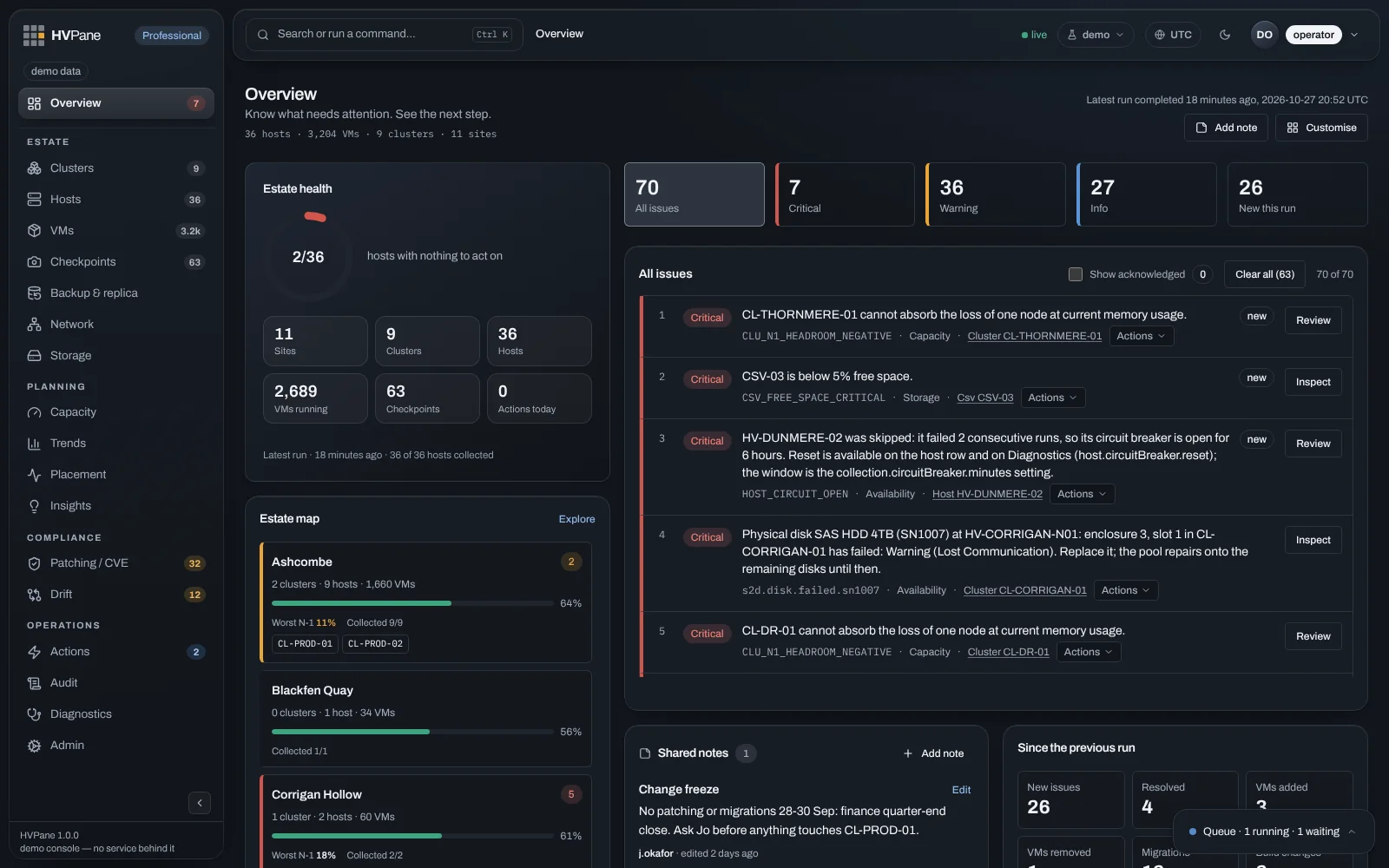
The HVPane Overview: one page ranking seventy issues across every cluster and site.
Estate clarity on one page. Every tool above answers for one host or one cluster. This is thirty‑six hosts across eleven sites, ranked.Demo estate · synthetic data, not a customer’s
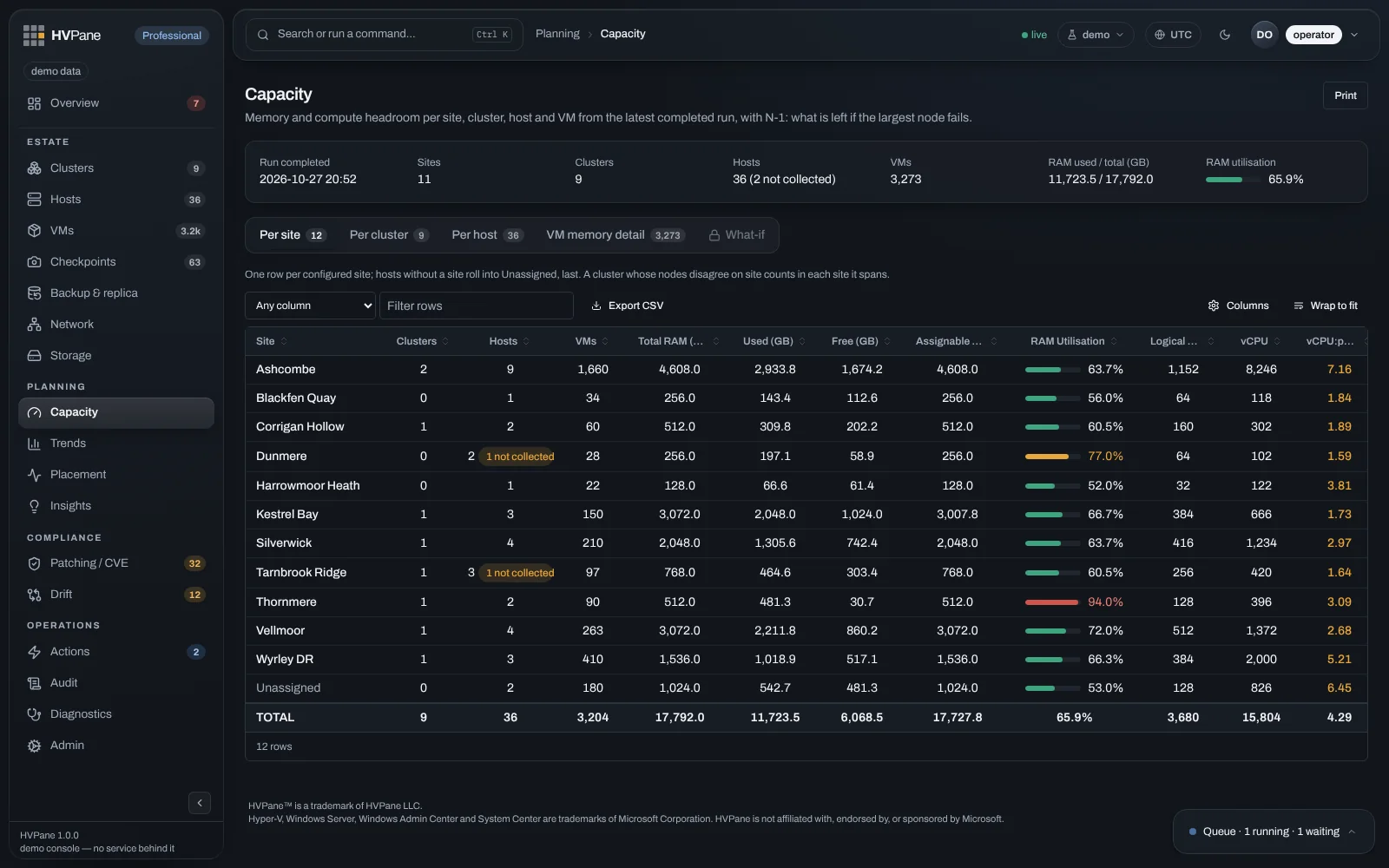
Capacity view with N-1 headroom per cluster.
Headroom you can stand behind. What still fits when you lose a node — before you lose one.Demo estate · synthetic data, not a customer’s
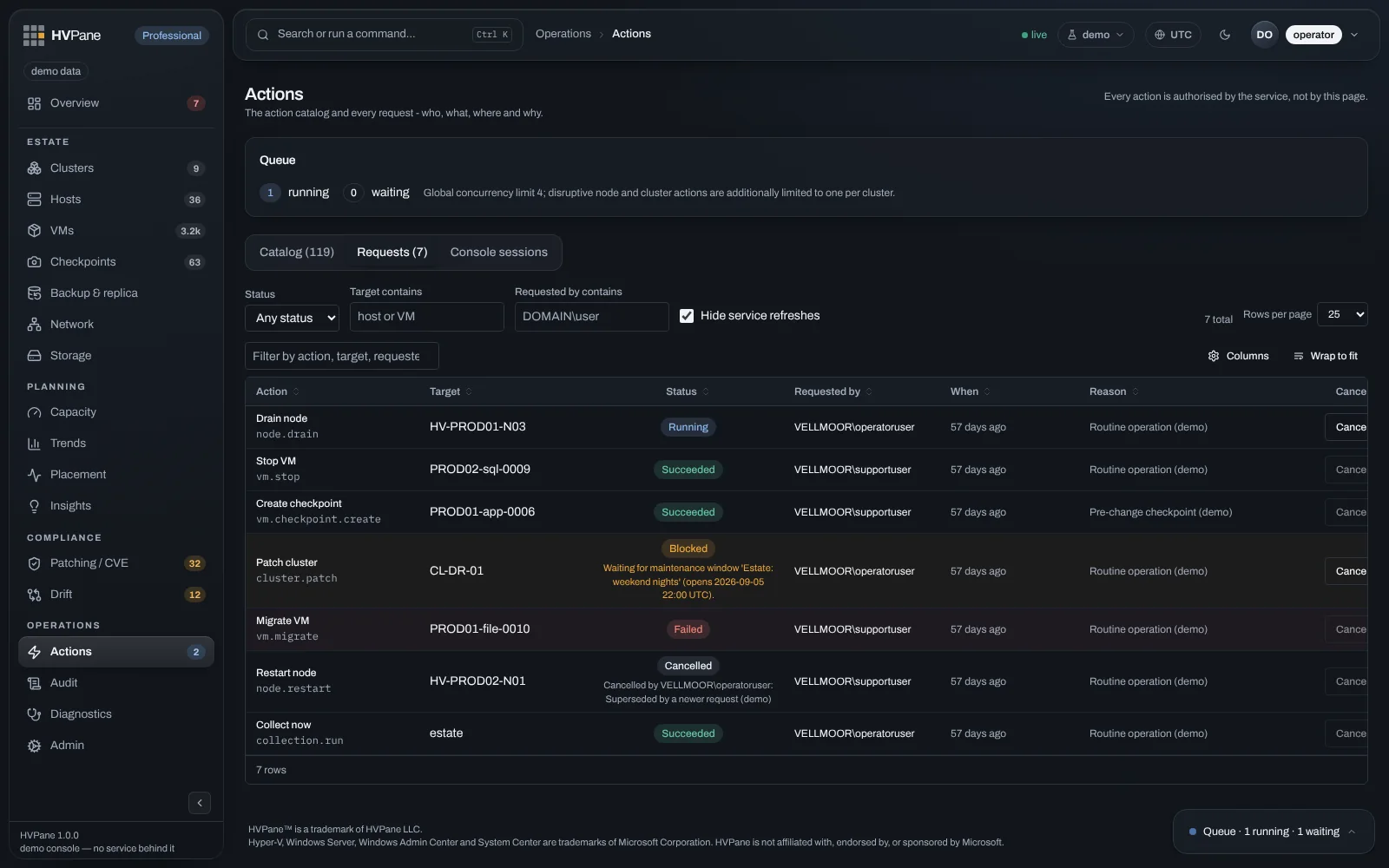
Actions log with operator, target and reason for each operation.
Actions with the person attached. Who ran it, where, and why — required on anything destructive.Demo estate · synthetic data, not a customer’s
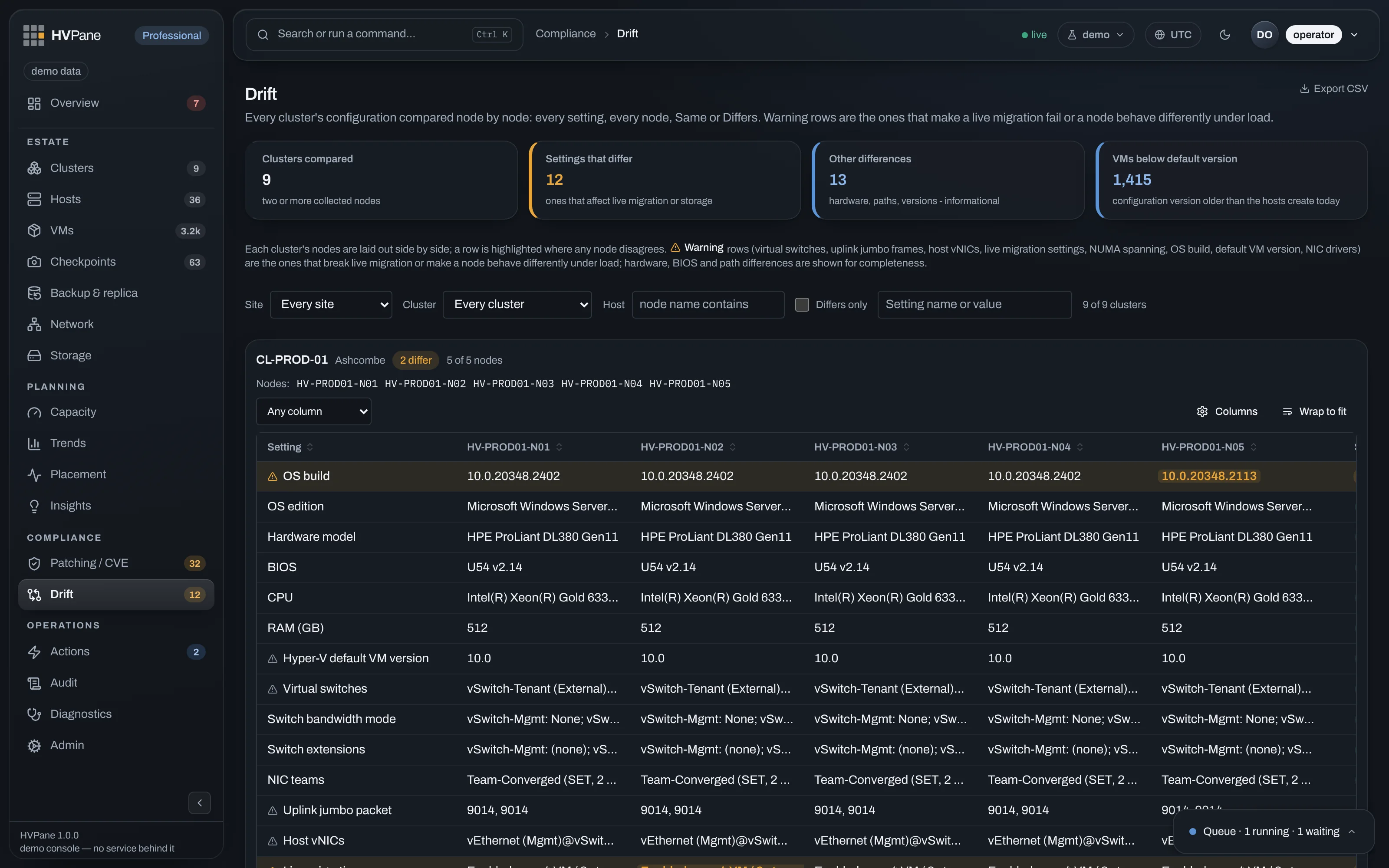
Configuration drift matrix showing node-by-node disagreements.
Drift evidence you can show. A standing node‑by‑node matrix — ready for the pack, not a one-off report.Demo estate · synthetic data, not a customer’s

What HVPane is, and what it is not

What it is

  • One page over the whole estate. Every host, every cluster, every site, ranked by what needs you.
  • A memory. What changed since the last sweep — new problems, resolved ones, machines that moved.
  • A forecast. Not that a volume is filling, but roughly when it will be full.
  • An audited way to act. Role-gated, queued, scheduled, and logged with who did what and why.

What it is not

  • Not a hypervisor. It does not run your virtual machines. Hyper-V does that, and keeps doing it if we disappear.
  • Not a replacement for Windows Server, for Hyper-V Manager, or for Windows Admin Center. Keep them. They are the right tools for deep, single-machine work.
  • Not a backup product. It will tell you about checkpoints nobody deleted. It will not protect your data.
  • Not multi-platform. If you need one console across Hyper-V, VMware and KVM together, we are honestly not it.

We do not compete with your hypervisor. We compete with the spreadsheet. With the tab you keep open, the script somebody wrote and left, and the half-hour every morning spent asking eleven clusters how they are.

Built to stay inside your walls

Your Hyper-V estate never leaves your network.

No cloud account. No tenant. No telemetry. No vendor endpoint. Your data stays where you put it — and every operator action leaves a trail you can export. Depth and honest limits live on Security.

Nothing leaves your network

Nothing about your estate is ever sent to us. No cloud account, no tenant, no telemetry — and no vendor endpoint in the product for it to call.

Every action, accounted for

Every operator action is recorded in a tamper-evident audit trail. Full detail — and the honest limits — on Security.

Export the evidence

Audit CSV over any date range — on Community, today. The security role can read every row on screen and cannot take the file.

Drift you can show

A standing node-by-node matrix that supports your CIP-010 evidence. We will never claim the product itself is CIP-010 compliant.

The audit log never ages out

Exempt from every retention setting. Never purged by the operation that clears everything else.

History stays until you say

Nothing deletes history on a timer. A person purges snapshots and metrics on purpose — and the purge is recorded.

Finding out costs nothing

Community is free, and not a trial. It reads the whole estate — every host, the trends, the forecasts, the N-1 headroom, what changed since the last run — on as many hosts as you own, for as long as you want. It is read-only, and that is the entire difference.

Install it, point it at what you have, and see what it finds. If what it finds is nothing, you have lost an afternoon and gained a page you can keep.