HVPane™
Security

It runs on your network and it never phones home.

Your estate stays inside your walls. No cloud account. No telemetry. No vendor endpoint. Sign in with the Active Directory you already run — and see, plainly, what the product will and will not claim.

Your data. Your perimeter.

Nothing leaves your network.

Nothing about your estate is ever sent to us. There is no cloud account, no tenant and no telemetry — there is no vendor endpoint in the product for it to call.

HVPane is self-hosted. It runs inside your network, on a machine you own. Estate data stays on that machine — not usage analytics, not crash reporting, not a licence check that phones home with your host count. We cannot see your estate. If you email us about a problem, you will have to tell us what it says.

What it connects to is all inside your estate: the hosts you have placed under management, your own directory, your own DNS, and a mail relay you configure. Nothing leaves your network for us.

Who can do what

Enforced on the server, not hidden in the page.

A greyed-out button is not a permission model. Every restriction below is checked where the work happens — so a request that should be refused is refused, whether it came from the interface or from anywhere else.

Four built-in roles

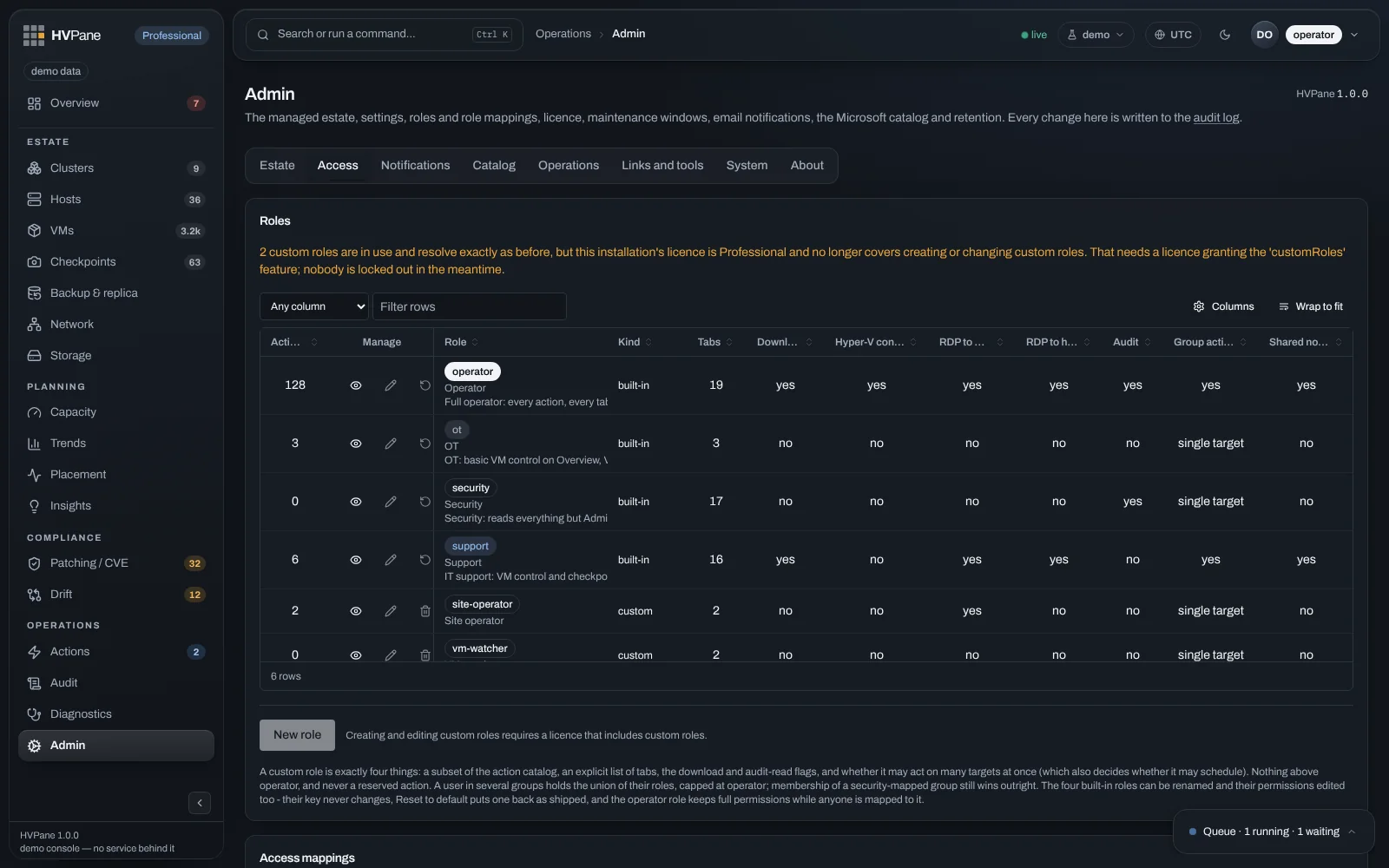
Full operator, support, OT and security — each mapped to your own Active Directory groups. You decide which group is which; we do not ship a user database.

Read is the default

Community, the free edition, is read-only. It cannot act on your estate at all, so on Community there is no action surface to secure in the first place.

Actions are gated and queuedRequires Standard and up

Every operation is checked against the caller’s role before it runs, queued rather than fired in parallel across your estate, and can be held to a maintenance window.

A reason is required

Destructive operations ask why, and the answer is recorded with the action. It is not an optional field.

Custom rolesRequires Enterprise

In preview, and we will not pretend otherwise. Define your own roles from the permissions HVPane has, mapped to your own Active Directory groups. A custom role cannot exceed the full operator set. Per-action and per-tab permissions are enforced from the role you defined — server-side, on every endpoint and in the queue.

The Admin Access tab: four built-in roles and two custom roles mapped to Active Directory groups, with action counts, tab counts and download and audit permissions per role.
Four built‑in roles, mapped to your own Active Directory groups. What each one may run, see and download is a row you can read — and the amber notice is the licence refusing something, not a tier tag.Demo estate · synthetic data, not a customer’s

Signing in

Your Active Directory account. No HVPane password.

Operators sign in with their existing Active Directory account — Windows Integrated Authentication, with a form fallback and multi-factor support. Nobody creates an HVPane password, and there is no separate directory of users to go stale.

If your identity team means SAML or OIDC when they say single sign-on, we do not have it. There is no federation to Entra ID, Okta or any other provider today. We would rather you learn that here than in a security review three weeks in.
The audit log

Every action, with the person attached.

Who did what, where, and why — recorded for every operation the product performs.

Every operator action is recorded in a tamper-evident audit chain, with verification built in.

That is tamper-evident, not tamper-proof. Here is what that does and does not claim:

  • Protects against database tampering The audit log is tamper-evident against someone with write access to the database.
  • Does not claim service-account resistance It is not tamper-proof, and does not resist someone who can run code on the management server as the service account or an administrator.
  • Entries before v1.24 Entries written before v1.24 are tamper-evident against accident only, permanently.

It is retention, not archival. Nothing ships the log to an external store and nothing makes it immutable off the box. If your compliance programme needs evidence somewhere an administrator cannot reach, export is what we have — and your pipeline carries it from there.

Exempt from every retention setting

The audit log is exempt from every retention setting. It is never aged out and never purged by the operation that clears everything else.

CSV export — true today

The audit log can be exported as CSV over any date range. Export is not licence-gated — it works on Community. Among the four built-in roles it requires both audit-read and download, which only the full operator holds today; the security role can read every audit row on screen and cannot take the file. On Enterprise, a custom role can be granted both permissions — and a custom role cannot exceed the full operator set.

Checkpoint attribution

A paid feature that gives the evidence back.

Hyper-V does not record who created a checkpoint. HVPane can — and because that is where a paid feature produces evidence rather than a view, the rules are worth stating plainly.Requires Professional

Configuration drift

Supports your CIP-010 evidence.

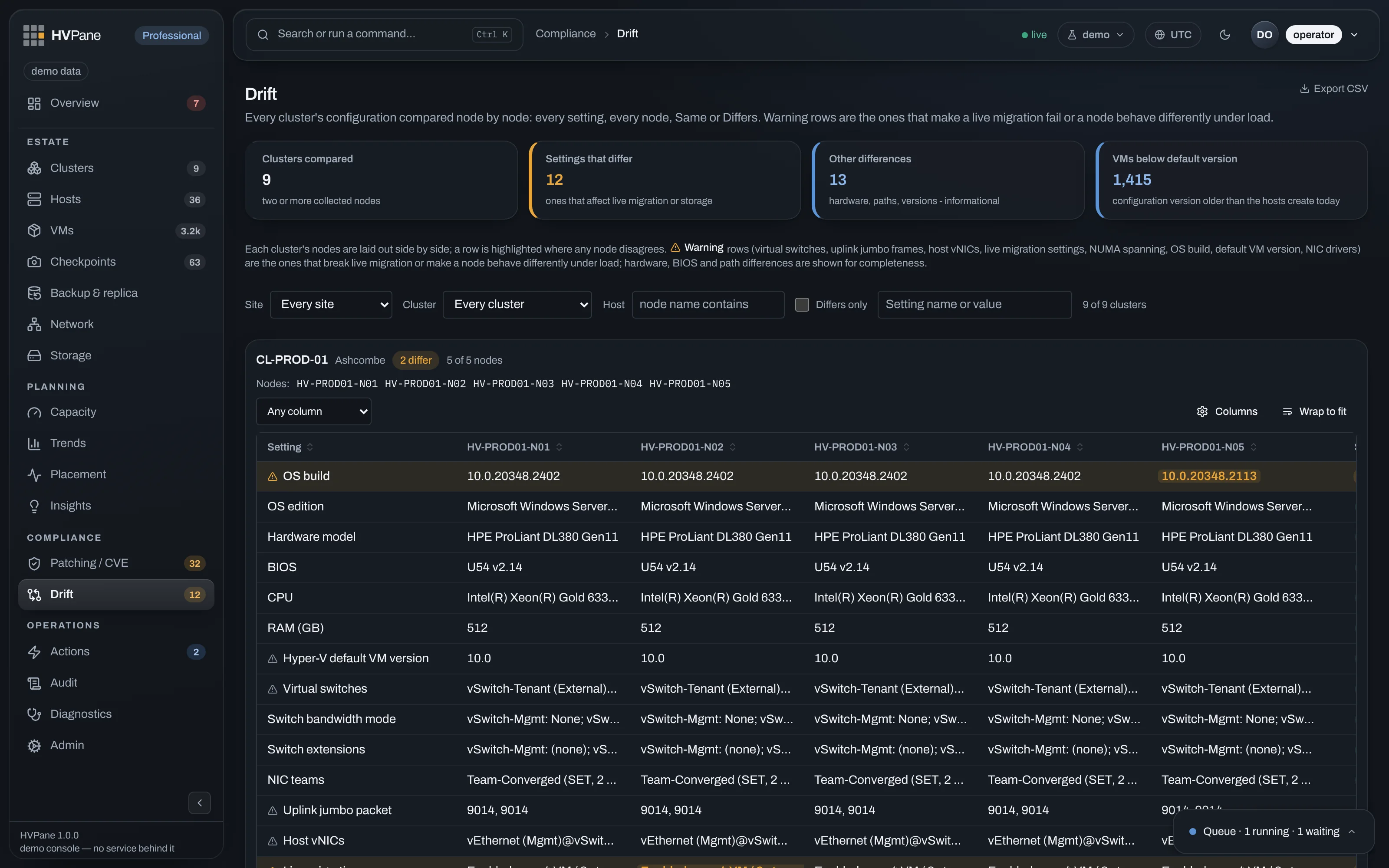
Configuration drift as a standing node-by-node matrix supports your CIP-010 evidence. A product cannot be CIP-compliant — only a registered entity can — so we will never say “CIP-010 compliant.” What we will say: the drift view is ready for your evidence pack, on Community, with no cloud account and nothing sent to us.

Configuration drift: node-by-node matrix ready for a CIP-010 evidence pack.
Drift you can put in the pack. Standing matrix, Community edition — evidence support, never a compliance claim.Demo estate · synthetic data, not a customer’s

Retention

Nothing deletes on a timer.

Retention periods are operator-configurable. Nothing deletes your history on a timer. Purging snapshots and metric history is something a person does, on purpose, and the purge is recorded like any other action.

History stays until someone you trust decides otherwise — and that decision is written into the audit log with the rest of the actions.

Boundaries

What it will not do for you.

Installing it

The download will warn you, and here is why.

Windows SmartScreen shows an unrecognised-app warning on a new publisher’s installer until that installer earns download reputation — weeks, and hundreds of clean installs. Since August 2024 no certificate prevents this, including the Extended Validation certificates once sold for exactly that purpose.

So we will not claim a clean first install. Code signing is being set up; until the certificate is issued our builds are unsigned, and we will say so on the download itself rather than let you discover it at the prompt.

Found something?

If you believe you have found a security problem, write to security_reports@hvpane.com. It is a monitored mailbox, not a form. We will confirm we received it and tell you what we intend to do. We have no bounty programme and will not pretend otherwise.

For anything else — a question on the above, a security review, a questionnaire you need filled in — hello@hvpane.com is the right address.